


Article by
Jonathan Dier
Jonathan Dier is the owner of A Aable Locksmith, a family owned and operated Locksmith company serving the Naples Florida area since 1979. He has over 35 years experience in the Locksmith and Security industry. A Aable Locksmith specializes in residential and commercial security, focusing on customer satisfaction.
A Wifi Enabled Keypad can let you enter a code at the door and may add remote access or alerts through a connected app. Those features can be useful, but they don’t solve every security or connectivity concern. Before choosing one, consider how it differs from a keypad-only lock, whether it suits your door and daily routine, and what happens if your Wi-Fi connection is interrupted.
The key distinction is connectivity: a keypad-only lock lets you enter a code at the door, while a Wi-Fi-enabled model may add app-based features such as remote control or status notifications. Those extras don’t replace a properly fitted physical lock, and available features vary by model. A good choice balances convenience with door compatibility, installation, and how you expect to use the lock.
This guide explains what Wi-Fi adds, what it can’t promise, and which features may be useful for your household. You’ll also learn what to consider before installation. A Aable Locksmith installs digital and Wi-Fi-enabled keypad locks for homes in Naples, Bonita Springs, Estero, Golden Gate, North Naples, East Naples, and Marco Island.
Key Takeaways
- A Wifi Enabled Keypad combines code entry with connected features, but the core way you unlock the door remains local.
- Remote access and notifications depend on the lock’s supported features and network connection. Consider which functions your household will actually use.
- Compare Wi-Fi and keypad-only locks by everyday entry, remote features, and how much you want the lock to rely on your network.
- Check your door type, existing hardware, Wi-Fi reach, and household routines before choosing replacement hardware.
- Professional fitting can help ensure your keypad lock fits the door and operates correctly.
What Does a Wi-Fi Enabled Keypad Lock Actually Do?
At the door, a Wi-Fi-enabled keypad lock may work much like a keypad-only model: enter an authorized code, and the lock responds. The network connection adds a separate set of possible features. These can be useful if you want to manage access while away or check the lock’s reported status without being at the door.
A Wi-Fi-enabled keypad lock combines code entry at the door with network-connected features that may be accessed through a compatible app or service. Exact functions depend on the lock model. A Wifi Enabled Keypad doesn’t automatically include every remote control, alert, or smart-home feature you may have seen advertised for other locks.
For a closer look at one Wi-Fi lock, watch this locksmith’s review:
Keypad entry and Wi-Fi connectivity are different features
Entering a valid code is the basic access method at the door. You don’t need to understand Wi-Fi or open an app to use the keypad. Depending on the lock’s design, code entry may continue to work without a Wi-Fi connection. Treat keypad access and network access as separate functions.
Wi-Fi may let the lock communicate with a home network and support additional features. Think of code entry as local access and Wi-Fi as a possible route to connected controls. The What is a smart lock? overview also explains how smart locks can combine electronic access with different connectivity methods.
What connected features might a Wi-Fi lock offer?
Depending on the model, an app may let you lock the door remotely, check its reported status, or receive an access notification. These options can help with specific routines, such as checking the lock after leaving home. They aren’t universal: app functions and internet requirements vary by manufacturer and model.
The keypad handles code entry at the door; network-dependent functions may require Wi-Fi, an app, or the manufacturer’s service. If the connection is unavailable, which features remain usable depends on the lock’s design. Review the model’s instructions to understand the difference, then focus on the features you’ll actually use. A Aable Locksmith provides digital keypad lock installation to help ensure the lock fits and operates correctly.
How Wi-Fi Keypad Locks Connect, Work, and Handle Access
A Wi-Fi keypad lock has two related but distinct jobs: it provides a way to enter a code at the door, and it may connect to a network to support additional access features. Setup typically involves following the manufacturer’s instructions and using any required app. Once configured, someone can enter a code at the keypad, while supported connected functions communicate through the lock’s network connection.
Setup steps, network requirements, and app functions depend on the model. Some features may also rely on the manufacturer’s service, so read the lock’s instructions to learn what works locally and what needs an internet connection. For general advice on protecting connected devices, see NIST’s Smart home cybersecurity best practices, including guidance on account and network security.
What happens when the Wi-Fi connection is unavailable?
A lost connection may interrupt remote controls, status checks, or notifications, but it doesn’t necessarily stop keypad entry. Whether an authorized code will still operate the lock depends on its design and configuration. Consider two separate questions: can you reach the remote feature, and can someone still use an authorized code at the door?
Before relying on remote access, learn how your specific model behaves offline. Check the manufacturer’s instructions for which functions need Wi-Fi or an app and which access methods remain available without a connection. Understanding this in advance can help your household plan for a network interruption.
How codes and connected access can support household routines
Keypad entry can reduce the need to carry a physical key, which may suit family members who come and go at different times. Some models let owners create individual or temporary codes, but that capability and the steps for adding or removing codes vary. App settings may also offer access notifications, depending on the lock and its software.
Think through who needs entry and how often access changes. A household that shares one code has different management needs from one that wants separate codes for different people. Notifications and code controls are conveniences, not automatic features of every Wifi Enabled Keypad.
Connectivity supports selected communications and access tools; it doesn’t replace the keypad, the lock’s electronic components, or the physical hardware securing the door. A Aable Locksmith offers professional digital keypad lock installation to help ensure the lock fits and operates correctly.
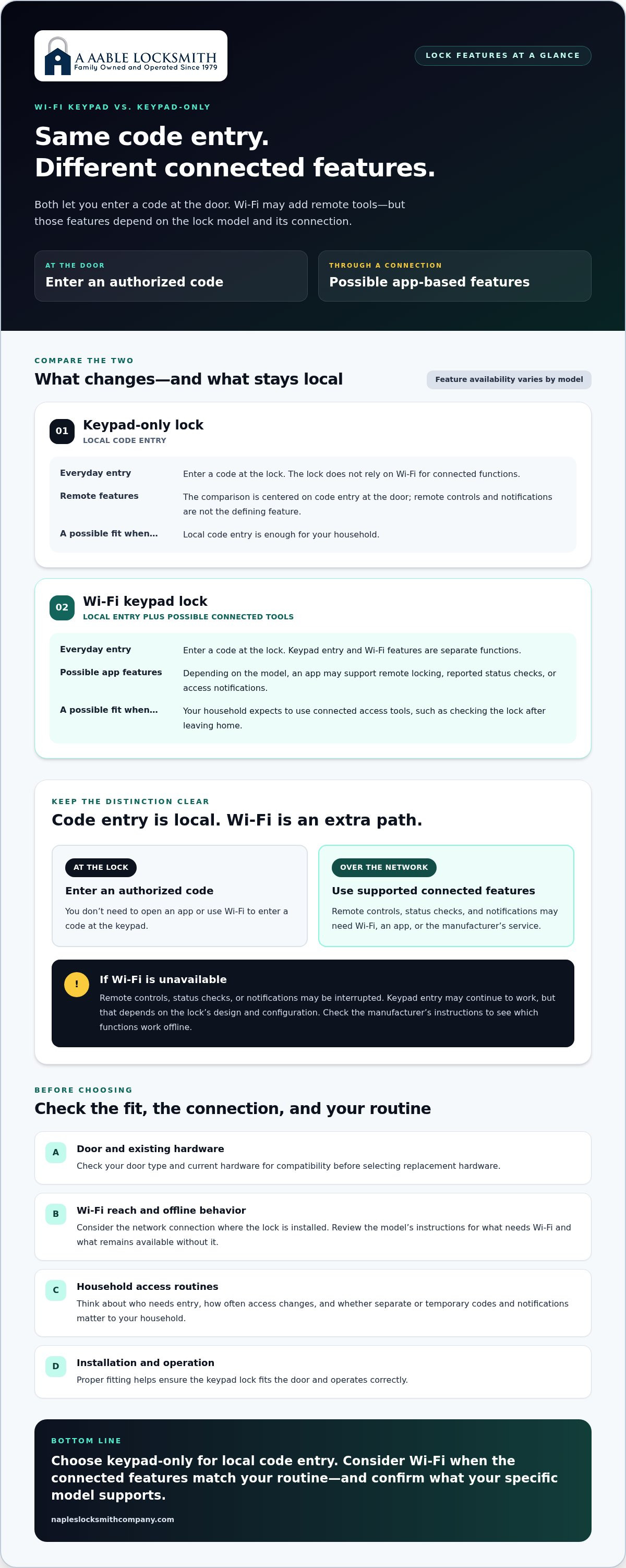
Wi-Fi Keypad Lock vs. Keypad-Only Lock: Which Suits You?
Both lock types let you enter a code at the door, so Wi-Fi isn’t required for keypad access itself. The difference is whether the lock connects to a network and offers additional connected functions. A Wifi Enabled Keypad may suit a household that wants remote access tools, while a keypad-only lock may be a better fit if local code entry is enough.
| Consideration | Wi-Fi keypad lock | Keypad-only lock |
|---|---|---|
| Everyday entry | Enter a code at the lock; exact options vary by model. | Enter a code at the lock; the lock doesn’t rely on Wi-Fi for connected functions. |
| Remote features | May support remote control, status checks, or notifications through an app. | Generally focuses on access at the door rather than network-connected tools. |
| Network dependence | Some app functions may need Wi-Fi, internet access, or manufacturer services. | No network connection is needed for keypad-only operation. |
Start with your routine rather than a feature list. If you often need to manage access while away, connected functions may be useful. If everyone enters at the door and you don’t need remote controls or alerts, a simpler keypad setup may cover the everyday need.
Does Wi-Fi make a keypad lock more secure?
Wi-Fi alone doesn’t determine how strong a lock is. Physical hardware, fit, and the way access is managed all matter. Connected access adds account and software considerations, while either type of keypad calls for thoughtful code management. Choose codes carefully, limit who knows them, and secure any account used to control connected features. Neither lock type is automatically safer simply because it does or doesn’t connect to Wi-Fi.
When is a keypad-only lock the simpler fit?
A keypad-only lock may suit a household that wants keyless code entry without managing app settings or remote features. A Wi-Fi model may offer more convenience if you value supported functions such as checking lock status from elsewhere. The right balance depends on what you’ll use, not how many features a lock can advertise.
Once you’ve weighed those needs, consider whether the lock fits your door and existing hardware. A Aable Locksmith provides digital keypad lock installation to help ensure the lock is fitted and operates correctly.
How to Check Door Fit, Wi-Fi Needs, and Installation Readiness
A lock can have useful connected features and still be the wrong fit for a particular door. Before choosing replacement hardware, consider the door, lock configuration, home network, and routines the lock needs to support. These details help narrow the options and make installation more straightforward.
- Identify the door and its existing preparation. Note the door type and the openings already made for the lock. The door’s thickness and existing preparation need to match the requirements of the specific lock model.
- Review the current hardware. Consider how the existing handle and deadbolt are arranged, and whether the new lock is designed to work with that configuration. Compatibility varies by model.
- Think about bolt alignment and movement. The deadbolt should move smoothly into its receiving opening. Misalignment or resistance can affect everyday operation, so the condition and alignment of the door hardware matter.
- Consider network reach at the door. Wi-Fi performance depends on the home network and the lock’s specific requirements. A connection that works well in one area of the home may not perform the same way at the entry.
- Match features to household routines. Decide who will use the keypad and whether you expect to use connected functions. That helps distinguish useful features from extras you may rarely need.
What door and hardware details should you consider?
Check the selected lock’s requirements for door thickness, existing preparation, and deadbolt compatibility rather than assuming one keypad fits every door. Fit is only part of the picture: correct alignment helps the bolt extend and retract without unnecessary resistance. A lock that doesn’t operate smoothly can be frustrating, even if its connected features are appealing.
When does professional installation make sense in Naples?
Homes in Naples, Bonita Springs, Estero, Golden Gate, North Naples, East Naples, and Marco Island can have different door styles, existing hardware, and network conditions. A locksmith can assess the door and lock configuration, check hardware alignment, and install the lock for its intended operation. A Aable Locksmith installs digital and Wi-Fi-enabled keypads for local homes.
Explore the service information for digital keypad lock installation.
For a keypad installation estimate, contact A Aable Locksmith.
Get a Wi-Fi Enabled Keypad Installed by a Local Locksmith
Choosing a connected lock is only part of the decision. The door, existing hardware, and the way the lock is fitted all affect how it operates day to day. Professional installation brings those details together, so you can use keypad entry and understand how the lock’s connected features fit your routine.
What to expect from a personalized installation
A Aable Locksmith installation considers the details that matter at your entry: the door and its existing hardware, the lock configuration, and how your household plans to manage access. A lock should suit the door, not force the door to suit the lock. The installation is tailored to the selected hardware and the conditions at your home.
Careful fitting and operation checks help ensure the keypad and lock work as intended. That includes attention to alignment and the lock’s movement, along with practical consideration of the access features you expect to use. If you’re weighing a Wifi Enabled Keypad against a simpler digital option, A Aable Locksmith installs digital keypad locks to suit residential security needs.
A Aable Locksmith is a family-owned, third-generation business serving Naples since 1979. The team provides personalized residential security services in Naples and nearby communities, including Bonita Springs, Estero, Golden Gate, North Naples, East Naples, and Marco Island.
Take the next step toward connected keyless entry
Talk through your door, keypad preferences, and the Wi-Fi features you hope to use with A Aable Locksmith. The company brings more than 45 years of residential and commercial security experience to keypad installation, from assessing the existing setup to fitting the chosen lock. Free estimates are available.
Choose Keyless Entry That Fits Your Home
The right lock depends on more than its connected features. A Wifi Enabled Keypad can offer remote functions that suit some household routines, while keypad-only models may be simpler when local code entry is all you need. Before choosing, consider how the lock works offline, whether its features match your needs, and whether the hardware suits your door.
Professional installation helps account for the existing door and lock configuration, so the keypad and bolt operate as intended. A Aable Locksmith is a family-owned, third-generation locksmith serving Naples and nearby communities since 1979, with more than 45 years of residential and commercial security experience. You’ll receive personalized service and a free estimate as you explore your options.
Schedule a free estimate for keypad lock installation With the right fit and practical guidance, you can choose keyless entry that works for your home and everyday routine.
Frequently Asked Questions
What is a Wi-Fi enabled keypad lock?
A Wi-Fi-enabled keypad lock combines code entry at the door with network-connected features that may be available through an app or manufacturer service. You can enter a code locally, while supported connected functions might include remote control, status checks, or notifications. Features differ by model, so a Wifi Enabled Keypad doesn’t necessarily offer every app function. Review the product details to identify which features suit your household’s access needs.
Can a Wi-Fi keypad lock work without internet?
Keypad entry may continue without an internet connection, but the exact behavior depends on the lock model and its setup. Remote control, status updates, and notifications may be unavailable if the connection is interrupted. Don’t assume that every lock behaves the same way offline. Review the manufacturer’s instructions to learn which access methods continue working and which connected features require internet access.
Are Wi-Fi keypad locks secure?
A Wi-Fi connection alone doesn’t determine a lock’s security. The physical lock, its fit on the door, and how access codes and connected accounts are managed all matter. Choose codes carefully, share them only with people who need access, and use strong account credentials for any associated app. Follow the manufacturer’s guidance for securing the device and account. These habits support responsible use without assuming connected locks are inherently safer or less safe.
Do Wi-Fi keypad locks need a hub?
Some Wi-Fi keypad locks connect to a home network directly, while other models may require a hub or bridge for particular connected functions. Requirements depend on the lock and the features you want to use. Review the manufacturer’s setup information before choosing a model, especially if remote access or smart-home integration matters to you. Don’t assume that every Wi-Fi lock needs a separate device or that all connected features work the same way.
Will a Wi-Fi keypad lock fit my existing door?
It depends on the lock model and your door’s thickness, existing openings, hardware arrangement, and deadbolt configuration. Check these details against the model’s fit requirements before selecting replacement hardware. A locksmith can assess the door and alignment to help ensure the lock fits and operates correctly. A Aable Locksmith serves Naples, Bonita Springs, Estero, Golden Gate, North Naples, East Naples, and Marco Island with residential keypad lock installation.
Can I install a Wi-Fi keypad lock myself?
Some homeowners may be able to install a lock by following the manufacturer’s instructions, provided the door and existing preparation are compatible. The work still requires attention to fit and alignment so the lock operates as intended. If you want help with installation, A Aable Locksmith provides digital keypad lock installation in Naples, Bonita Springs, Estero, Golden Gate, North Naples, East Naples, and Marco Island.
Is a Wi-Fi keypad lock better than a keypad-only lock?
Neither option is automatically better; it depends on how you want to manage access. Both allow code entry at the door, while a Wi-Fi model may add app-based features such as remote controls or notifications. A keypad-only lock may suit you if local code entry is enough and you don’t need connected functions. Compare the features you’ll use, network requirements, and door compatibility to choose what fits your home and routine.


