


Article by
Jonathan Dier
Jonathan Dier is the owner of A Aable Locksmith, a family owned and operated Locksmith company serving the Naples Florida area since 1979. He has over 35 years experience in the Locksmith and Security industry. A Aable Locksmith specializes in residential and commercial security, focusing on customer satisfaction.
A reset isn't the right first move for every Schlage keypad problem. For troubleshooting in Naples, start by identifying the symptom before changing the lock’s settings. Reserve a factory reset for problems simpler checks don’t resolve.
A sluggish keypad, rejected code, or failed app connection can make a dependable lock feel unpredictable. Learn how to address code and pairing problems, Wi-Fi trouble, keypad response, and lock operation, and decide when a reset makes sense.
Work through the checks in order, starting with the basics. You’ll learn when a mechanical issue may affect electronic locking and when professional repair or a new keypad setup may be the practical next step.
Key Takeaways
- Identify whether the trouble points to batteries, a keypad code, a wireless connection, or the door hardware before choosing a fix.
- Use the lock’s model and its connection requirements to narrow down pairing and Wi-Fi problems.
- Learn what to consider when the programming code is lost and why a factory reset affects saved user codes.
- Recognize common keypad feedback, including red indicators and beeps, to better understand rejected codes.
- Find out how a binding deadbolt can interfere with electronic locking and when digital keypad service may help.
When Should You Reset a Schlage Keypad Lock?
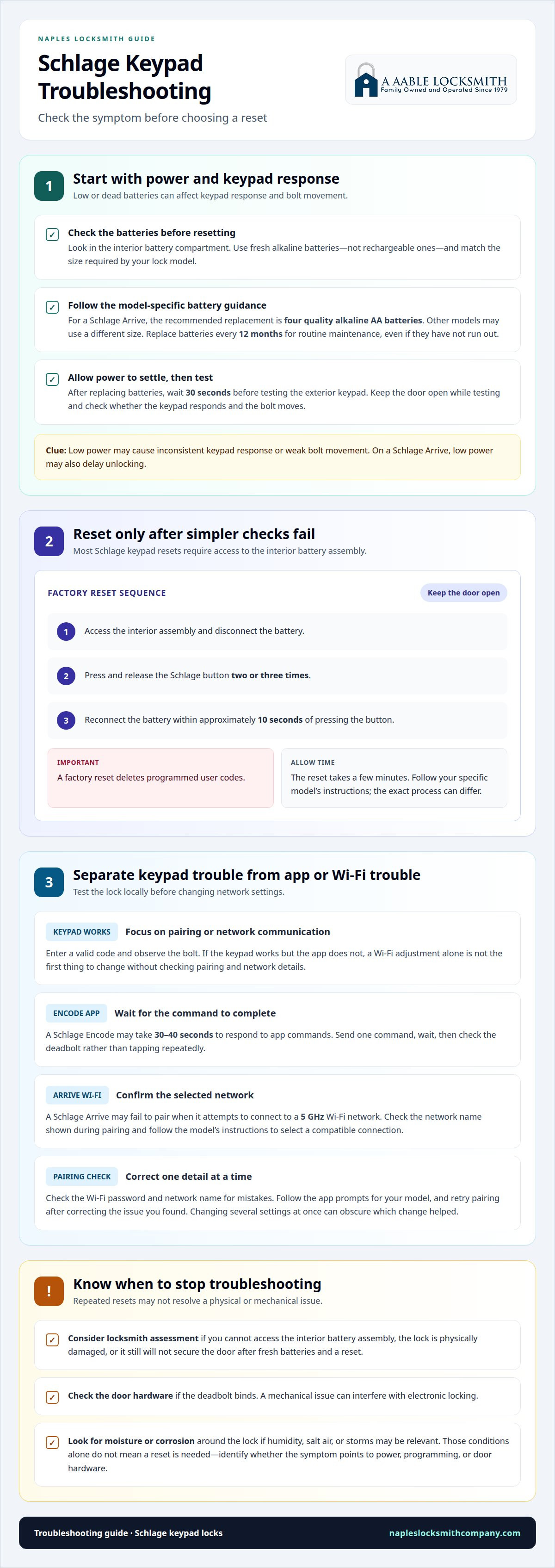
Check the power supply before resetting a Schlage lock. Fresh batteries may fix the problem without a factory reset.
Call a locksmith if you can’t access the interior battery assembly, the lock is physically damaged, or it still won’t secure the door after fresh batteries and a reset. A locksmith can assess the keypad and lock mechanism without repeated reset attempts.
To restore factory settings, most Schlage keypad locks require access to the interior assembly. Disconnect the battery, press and release the Schlage button two or three times, then reconnect the battery within approximately 10 seconds; the reset deletes programmed user codes.
Humidity, salt air, or storms may be relevant if you see moisture or corrosion around the lock. Those conditions alone don’t mean a reset is needed. First determine whether the symptom points to power, programming, or door hardware.
-
Check for Low or Dead Batteries
Open the interior battery compartment and check for depleted batteries before attempting a reset. Low or dead batteries are a common reason a Schlage keypad won’t lock from outside. On a Schlage Arrive, low power may also delay unlocking. Treat battery trouble as an early possibility if the keypad responds inconsistently or the bolt moves weakly.Use fresh alkaline batteries, not rechargeable ones, which may provide inconsistent voltage. Battery size depends on the model, so match the compartment requirements. If a reset failed while the batteries were weak, replace them first. Repeating the reset with unreliable power may leave the underlying issue unresolved.
-
Replace Batteries After Low-Battery Warnings
Replace the batteries when the lock gives a low-battery warning instead of waiting for the keypad to stop working. Schlage Arrive locks may unlock after a delay when power is low; the recommended replacement is four quality alkaline AA batteries. Other Schlage models may use a different size, so check your lock’s requirements.After replacement, wait 30 seconds before testing the exterior keypad. Use fresh alkaline batteries instead of rechargeable cells. For routine maintenance, replace Schlage lock batteries every 12 months, even if they haven’t run out. If the warning remains, confirm the batteries are seated correctly before moving to a reset.
-
Disconnect Batteries Before Resetting
Access the interior assembly before starting a factory reset. Most Schlage keypad locks can’t be factory-reset using only the exterior keypad because the battery must be disconnected. Keep the door open while you work, so a failed test doesn’t leave you locked out.With the battery disconnected, press and release the Schlage button two or three times. Then reconnect the battery within approximately 10 seconds of pressing the button. Follow the instructions for your specific model, since the exact reset process can differ. Remember that a factory reset deletes previously programmed user codes.
-
Allow Time for the Reset
Once the interior battery compartment is accessible, a reset takes a few minutes. Keep the battery within reach before beginning, so you can reconnect it promptly after pressing the Schlage button. Reconnection timing matters: the battery should be reconnected within approximately 10 seconds.After restoring power, allow 30 seconds after a battery replacement before testing the exterior lock. Test with the door open and observe whether the keypad responds and the bolt moves. If the lock still fails after fresh batteries and a correctly timed reset, stop repeating the sequence. A digital keypad lock assessment can help distinguish a keypad fault from a mechanical problem.
Pairing and Wi-Fi connection issues
First distinguish keypad problems from app and network problems. A Schlage Encode may respond more slowly to app commands than to keypad entry.
- Test the keypad before changing Wi-Fi settings. Enter a valid code at the door and note whether the lock responds. If the keypad works but the app doesn’t, focus on pairing or network communication. If neither works, a Wi-Fi adjustment alone is unlikely to solve the problem.
- Give Schlage Encode app commands time to complete. An Encode lock may take 30-40 seconds to respond, so avoid tapping the command repeatedly. Send one lock or unlock command, wait, then check the deadbolt. Repeated commands can make it harder to tell whether the first instruction reached the lock.
- Check the Wi-Fi network selected during setup. A Schlage Arrive may fail to pair when it attempts to connect to a 5 gHz Wi-Fi network. Confirm the network name shown during pairing before restarting the setup. If the lock keeps selecting that network, follow the model’s pairing instructions to choose a compatible connection.
- Re-enter the network details carefully. A mistyped Wi-Fi password or selecting the wrong network can interrupt setup. Compare the information entered in the app with your home network details. Make one correction at a time, then retry pairing and note whether the app moves forward.
- Keep your phone and lock ready during pairing. Open the Schlage app and follow the on-screen prompts for your specific model. Avoid switching apps or starting another setup attempt midway. If a prompt fails, note where the process stopped. That detail can help distinguish an app issue from a network-selection problem.
- After a failed pairing attempt, check whether the lock still works locally. Test the keypad and observe the bolt, then compare the result with the app response. If the keypad works but the app doesn’t, the issue may be connectivity. If the keypad also fails, troubleshoot the lock separately instead of repeating Wi-Fi setup.
- Retry pairing only after correcting the issue you found. For example, if a Schlage Arrive selected the 5 gHz network, address network selection before starting again. Follow the model’s prompts from the beginning and wait for each screen to finish. Changing several settings at once obscures which change helped.
- Consider digital keypad lock installation when setup remains unresolved or you’re planning a replacement. A lock assessment can help determine whether the problem involves pairing, the network, or the keypad itself, instead of treating every connection failure as a reason to reset.
Resetting after losing the programming code
If you’ve lost the programming code, a factory reset may restore access to setup. It also deletes every previously programmed user code. Before resetting, make sure you can access the lock’s interior assembly and plan to program codes again afterward.
- Keep the door open while preparing for the reset. This lets you work at the interior assembly without risking a lockout. Confirm that the keypad lock is stable on the door and that you can access its battery compartment. Don’t begin if the door must remain secured during the process.
- Identify the Schlage model before changing its settings. Reset steps can differ, so follow the instructions for that specific lock rather than assuming every keypad uses the same sequence. If the model name isn’t obvious, look for the lock’s identification before starting.
- Know what a reset removes: all previously programmed user codes. Household members may lose their existing entry codes, so list who will need access without leaving sensitive codes somewhere exposed. Plan to reprogram access afterward.
- Access the interior battery assembly before attempting a factory reset. Most Schlage keypad locks can’t be reset using only the exterior keypad because the battery must be disconnected. If you can’t safely reach the interior assembly, stop rather than forcing the cover or lock components.
- Disconnect the battery, then press and release the Schlage button two or three times. Reconnect the battery within approximately 10 seconds of pressing the button. Keep the battery close before beginning, because missing that reconnection window can interrupt the sequence.
- After reconnecting power, wait for the lock to complete startup. Follow the model-specific reset instructions to finish setup. Restoring power alone doesn’t reprogram the lock. If the sequence fails, don’t repeat it rapidly. Review each step and confirm the battery connection.
- Reprogram user access after the factory reset. Follow the correct instructions for your Schlage model, then test each new code with the door open. A successful keypad response confirms the code was accepted. Also check that the bolt moves as expected.
- Stop and seek help if the lock won’t enter setup, the interior assembly is inaccessible, or the reset repeatedly fails. A locksmith can assess the lock without guessing at its model-specific sequence. For persistent keypad issues, professional help can establish whether the problem is procedural or mechanical.
A Schlage Arrive lock that rejects a user code may show 3 red X's and sound 3 beeps. Check its model-specific instructions before attempting another reset.
Schlage Arrive keypad and user-code problems
Distinguish a rejected code from a keypad that won’t respond. On a Schlage Arrive, three red X’s and three beeps can indicate that a user code was rejected.
- Enter the code once and observe the keypad. Note whether the Schlage Arrive shows three red X’s and sounds three beeps. That feedback indicates code rejection, not necessarily keypad failure. Avoid rapid repeat attempts. Record the exact response and check which code you entered.
- Confirm that you’re entering a user code, not a programming code. They serve different purposes, so using one when the other is required can prevent the intended action. Check the instructions for your Schlage Arrive model to identify the code type needed for the keypad operation.
- Review how you entered the user code. Press each digit deliberately, in order, and watch for the keypad’s response. If you mistyped a digit, stop and enter the complete code carefully again. If it’s still rejected, check the programmed code rather than changing Wi-Fi settings.
- Keep model-specific rules separate. A Schlage Connect code rule does not automatically apply to Schlage Arrive. On Schlage Connect, a new User Code cannot match the first 4-6 digits of the existing Programming Code. Don’t use that restriction to diagnose an Arrive code unless the lock is actually a Connect model.
- Check whether the problem started after a code or settings change. If an Arrive code worked before a recent programming change, review the steps you followed. Use the Arrive instructions to add or update codes, and don’t apply Connect programming sequences to an Arrive lock.
- Distinguish a rejected code from a nonresponsive keypad. On Schlage Arrive, three red X’s and three beeps signal code rejection. If the keypad gives no response, note that separately and troubleshoot power or keypad operation. The signal helps you choose what to investigate.
- Test the accepted code with the door open. Enter it and observe whether the Schlage Arrive responds as expected. This lets you watch the bolt without relying on a closed-door test. If the lock continues rejecting a carefully entered code, follow the model’s programming instructions before considering a factory reset.
- Keep the programming code private while restoring access. Don’t write it where visitors can see it or confuse it with a daily user code. If an Arrive lock still rejects valid entries after you follow its instructions, stop repeated attempts and seek help diagnosing the keypad or programming.
Schlage Encode keypad response and lock operation
Check keypad response and deadbolt movement separately. Test both before choosing a fix.
-
Troubleshoot a Keypad That Won’t Unlock
Enter a valid code once, then watch the Schlage Encode keypad. Note whether its lights respond and whether the bolt moves. If the keypad accepts the code but the bolt stalls, check the door’s alignment with the strike plate. A deadbolt stuck even 1-2 mm may fail to engage electronically.Test the lock with the door open. If the bolt operates freely while open but binds when closed, the door or strike alignment may be involved. Don’t force the deadbolt against resistance. If the keypad rejects the code, investigate code entry separately rather than assuming the bolt is jammed.After too many incorrect User Codes on a Schlage Connect lock, wait 30 seconds before trying again. That timing applies to Connect, not automatically to Encode. Keep the model distinction clear while troubleshooting, and don’t repeatedly enter guesses. A careful test separates a code issue from a mechanical obstruction.
-
Interpret Beeps and Flashing Lights
Observe the exact light pattern and sound before taking action. A red X before the full code may indicate a lock issue, so check the instructions for your specific model before deciding what to do. Don’t mistake this specific signal for an ordinary rejected-code response or keep trying codes to clear it.Record whether the red X appears before or after the final digit. The timing matters: the documented replacement condition is a red X before the full code is entered. Interpret other signals according to the specific Schlage model, rather than assigning meaning based on a similar-looking keypad.Note, for example, whether a beep occurs with a light, after code entry, or during bolt movement. These details help distinguish a code response from an operating problem. Don’t infer a fault from one sound alone. Compare the signal and timing with your lock model’s instructions.
-
Respond to an Unresponsive Keypad
Press a keypad button once and watch for a light, sound, or display response. If nothing happens, stop pressing repeatedly and note whether the lock still operates from the app. An app response with a silent keypad points to a different symptom from a keypad and app that both fail.Check the door with the lock open, then test the keypad again. If the keypad responds but the deadbolt binds only when the door closes, inspect the bolt’s path and strike alignment. Even a 1-2 mm obstruction can prevent electronic engagement, so don’t force the lock through resistance.A keypad warning before code entry is complete may indicate a problem that needs assessment. If the keypad remains unresponsive or the bolt won’t move freely, stop repeated attempts and arrange an assessment. Record the light pattern, sound, when it occurs during code entry, and the result of the door-open test. This helps identify the next step.
A Aable Locksmith: Digital Keypad Lock Installation
A Aable Locksmith provides Digital Keypad Lock Installation when a keypad lock keeps malfunctioning or replacement is the practical next step. After troubleshooting, consider installation if the existing lock won’t respond reliably or continues to operate inconsistently. The setup should suit the door and the hardware.
For homeowners in Naples, a digital keypad can provide code-based access without relying on a traditional key for every entry. A Aable Locksmith also installs cabinet locks and provides lock rekeying and sliding glass door lock security.
Contact A Aable Locksmith about digital keypad lock installation
Keep Your Entry Reliable
A keypad lock should make everyday access straightforward, not add uncertainty at the door. If problems continue after you’ve identified the symptom, consider the lock’s overall fit and condition, not just its latest error. For Schlage keypad lock troubleshooting in Naples, a locksmith can assess whether repair or a different keypad setup is appropriate.
A Aable Locksmith offers Digital Keypad Lock Installation, Lock Rekeying, and Sliding Glass Door Lock Security. These services address different entry needs, from keypad access to changing who can use an existing lock.
Reliable entry starts with a clear diagnosis and hardware suited to the door. Take the next step with confidence.
Frequently Asked Questions
How do I replace the batteries in a Schlage keypad lock, and what battery type does it use?
Open the interior battery compartment and replace its cells with fresh alkaline batteries. Battery size depends on the Schlage model, so use the type specified for your lock instead of assuming every keypad takes the same cells. For example, a low-battery Schlage Arrive calls for four quality alkaline AA batteries. After changing them, check that the compartment closes securely.
How do I add or change user codes on a Schlage keypad lock?
Use the programming instructions for your exact Schlage model, since the button sequence and code rules vary. Keep the programming code separate from everyday user codes, and store both securely. For example, Schlage Connect won’t accept a new User Code that matches the first 4-6 digits of its existing Programming Code. After changing a code, test it with the door open.
Where can I get Schlage keypad lock repair or locksmith service in Naples, Florida?
A Aable Locksmith provides lock repair and digital keypad lock installation in Naples. If a Schlage keypad continues to fail after basic troubleshooting, a locksmith can assess whether the issue involves the lock or its installation. Share the model name and describe what the keypad does, including any lights, sounds, or bolt movement. This helps focus the service on the problem you’re experiencing.


