


Article by
Jonathan Dier
Jonathan Dier is the owner of A Aable Locksmith, a family owned and operated Locksmith company serving the Naples Florida area since 1979. He has over 35 years experience in the Locksmith and Security industry. A Aable Locksmith specializes in residential and commercial security, focusing on customer satisfaction.
One key plan can simplify office access without giving every employee access to every room. For an office building master key system in Naples, start by mapping doors by area, identifying who needs access to each one, and organizing commercial keys cut by code around those employee privileges.
A well-planned system keeps access to offices, storage rooms, and shared areas organized. Match each person’s access to their role instead of issuing keys that open more doors than they need.
This guide explains how to group Naples office areas, choose a suitable master-key structure, plan employee access, and keep key assignments current as needs change. It also covers what to consider when existing locks or hardware need attention.
Key Takeaways
- Choose a key hierarchy that matches the building’s layout, from individual doors to shared areas and restricted rooms.
- Map employee access needs before assigning keys so each person can reach the areas required for their work.
- Plan the system around the existing doors and hardware, and keep a clear record of key assignments.
- Reduce duplication risks by controlling who holds keys and setting a process for collecting them when access needs change.
- Compare mechanical keys with keypad access based on how the office manages entry and employee permissions.
What types of master key systems are best for office buildings?
Choose the key hierarchy by matching each office door to the people who use it. A single-suite Naples office needs less complexity than a building with shared corridors, private offices, and restricted records rooms.
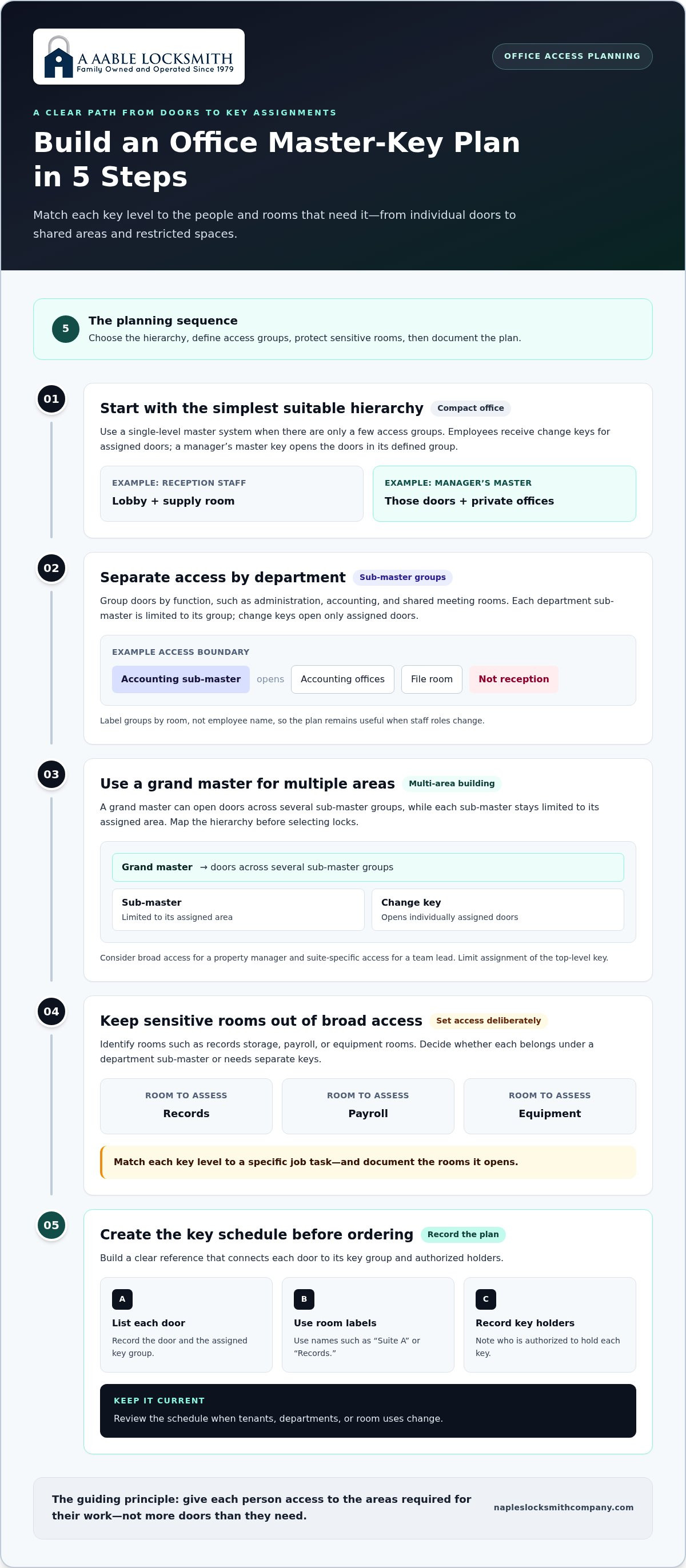
- Start with a single-level master system for a compact office. Each employee receives a change key for assigned doors, while a manager’s master key opens the doors in that defined group. For example, reception staff might access the lobby and supply room, while the manager can access both plus private offices. This structure is easy to understand when the building has only a few access groups.
- Use sub-master groups when departments need separate access. Divide doors by function, such as administration, accounting, and shared meeting rooms. A department sub-master opens doors within its group, while individual change keys open only assigned doors. For example, an accounting sub-master could open accounting offices and a file room without opening reception. Label groups by room, not employee name, so the plan remains useful when staff roles change.
- Consider a grand master hierarchy for a multi-area building. A grand master can open doors across several sub-master groups, while each sub-master remains limited to its assigned area. Map the hierarchy before selecting locks: list exterior entrances, common areas, suites, and restricted rooms. A property manager may need broad access, while a team lead may need access only to one suite. Limit assignment of the top-level key.
- Keep sensitive rooms outside broad access groups. Identify spaces such as records storage, payroll, or equipment rooms, then decide whether they belong under a department sub-master or need separate keys. A key that opens every office door may be convenient, but it also grants more access than some staff need. Match each key level to a specific job task and document the rooms it opens.
- Build a clear key schedule before ordering keys. Record each door, its assigned key group, and the authorized key holders. Use consistent labels such as “Suite A” or “Records,” rather than relying on memory or informal descriptions. Review the schedule when tenants, departments, or room uses change. For an office building master key system in Naples, a clear hierarchy helps maintain access boundaries without giving every employee a building-wide key.
What Florida rules apply to commercial locksmiths and master key systems?
Separate authorization questions from key-plan decisions. Florida requirements can involve the locksmith’s work, the building’s doors, and the property owner’s authorization. A master-key chart alone does not resolve all of these considerations.
- Identify who can authorize the work. Before changing a lock or arranging keys, record the property owner, authorized manager, and affected tenant. For a multi-tenant Naples office, distinguish the building owner’s authority over common doors from a tenant’s control over its suite. Keep written approval with the work order. This creates a clear record of permission and helps prevent disputes about who requested a change.
- Describe the work precisely. List whether the job involves changing a cylinder, installing hardware, cutting keys, or altering a door’s operation. These tasks can raise different legal and building questions. For example, replacing a suite lock differs from changing a shared exit door. A written scope helps the owner identify the applicable building requirements and responsible parties before work starts.
- Review building and fire-safety requirements for affected doors. Identify any door used for exiting, shared access, or emergency movement. Do not treat master-key convenience as the only design goal for these doors. A restricted records room and a shared corridor door have different functions. Have the building’s responsible manager assess applicable requirements before approving changes to exit-related hardware.
- Separate legal requirements from building policies. Florida law and local building rules are not the same as a lease, property-management procedure, or company key policy. Record each source separately. A lease may identify who controls a tenant’s entry, while an internal policy may name who receives a key. Keeping these documents distinct helps staff avoid presenting a workplace rule as a statewide legal requirement.
- Keep records that explain the decision. Store the approved work scope, door list, key assignments, and any building review together. If a manager later changes access to an office or storage room, update the record and note who approved it. For an exit door, retain the hardware decision separately from routine office-key assignments. Clear records help owners explain how access decisions were made.
For a commercial project in Naples, review authorization, door function, and building requirements before changing hardware. This keeps the key plan grounded in how the property is used, rather than assuming one master-key design fits every Florida office. Property managers can also read about commercial locksmith services in Naples for property managers.
What are the steps to design and install a master key system for an office building?
Work from a door inventory to a tested key schedule. Each stage should leave a clear record for the building owner to review before installation.
- List every door in the project. Walk the building and record each entrance, suite, interior office, storage room, and shared space. Give doors consistent labels, such as “Main Entrance,” “Suite A,” and “Records Room.” Note existing lock and hardware types alongside each label. This inventory becomes the working map for deciding which openings belong in the system.
- Identify who uses each space. For every door, list the roles that need regular access and those that need broader access. For example, reception staff may need the lobby and supply room, while an office manager may also need administrative offices. Use job roles rather than employee names so the plan remains readable when staffing changes.
- Group doors according to daily work. Place doors with similar users in the same access group. Accounting offices and a related file room might form one group, while a conference room remains shared. Keep restricted spaces separate from broad groups when their users differ. This turns the inventory into a practical access plan rather than a list of unrelated locks.
- Build the key schedule before ordering keys. Record which change key opens each assigned door and which higher-level keys open groups. Show door labels, key labels, and authorized roles together. For keys cut by code, keep the code reference tied to the approved schedule. A clear chart helps reveal accidental overlap before keys are made.
- Review existing hardware against the plan. Compare each lock with the intended keying arrangement and the door’s function. A suite lock, storage cabinet, and shared entrance may require different hardware. Flag worn or mismatched components for attention before setting an installation sequence. This helps avoid building a schedule around a lock that does not suit its opening.
- Install in a controlled sequence. Coordinate work by area, such as completing Suite A before moving to shared rooms. Identify approved and newly assigned keys with their schedule labels. During handover, give each authorized person only the keys assigned to their role, and record the assignment against the matching door group.
- Test the finished system and update the record. Try each change key at its assigned doors, then test each higher-level key against its listed group. Confirm that a key for one department does not open a separate restricted room. Correct discrepancies before relying on the schedule, then keep the final chart for future access changes.
What security risks come with master keys, and how can key duplication be controlled
A master key can open several doors, so losing one may affect multiple offices. Limit unnecessary access and keep key duplication accountable with these steps.
- Limit who receives each key level. A change key should open only the doors assigned to its user. A department lead may need a sub-master for several rooms, while general staff may need only their own suite. Reserve broad master keys for designated roles and record the reason for each assignment. This reduces the number of people who can access unrelated areas.
- Track every key from handover to return. Keep a register with the key label, assigned person, door group, issue date, and return status. For example, record whether “Suite A Staff” remains with an employee or has been returned after a role change. Update the register whenever a key changes hands. Accurate records help identify which access assignments need attention after a loss.
- Set a written duplication approval process. Name the person who can approve additional keys and require a documented request before duplication. Include the requested key label, quantity, recipient, and business reason. For instance, a request for another “Records Room” key should identify who needs it and which manager authorizes it. Keep approval records with the key register.
- Don’t treat a stamped warning as a complete control. A “Do Not Duplicate” marking communicates an instruction, but staff still need a clear process for key custody and approval. Tell employees to route requests through the named manager. Record each approved copy against its key label so the building can distinguish authorized copies from untracked ones.
- Respond to lost keys by checking the access they provide. Identify the missing key’s level and list every door it opens. A lost change key may affect one office, while a lost master key could affect several groups. Use that map to decide whether the affected locks need attention. Record the incident, the decision, and any changes to the access plan.
- Collect keys when access ends or changes. Add key return to the employee departure or role-change process. Compare returned labels with the register, then follow up on any missing key. If a staff member moves from reception to accounting, review whether their old key still matches their duties. This prevents outdated assignments from remaining in circulation.
- Review key records on a set schedule. Compare the register with current staff roles, door groups, and issued keys. Remove obsolete entries and document unresolved discrepancies. A review can reveal duplicate assignments, keys with unclear holders, or access that no longer matches a room’s use. Keep the latest approved record available to the person responsible for building access.
Should an office building choose a mechanical master key system or electronic access control
Compare how each approach handles daily entry, staff changes, and access records. A small Naples office with stable teams may suit mechanical keys, while changing permissions may make electronic access more suitable.
- Choose mechanical keys when simplicity is the priority. A mechanical system uses physical keys and a planned lock hierarchy. Staff carry keys for assigned doors, while designated managers hold keys with broader access. This can be straightforward to administer in an office with a few suites and stable staff roles. The tradeoff is that key distribution and recovery depend on physical handovers and accurate records.
- Choose electronic access when permissions change often. Electronic systems use credentials, such as codes or cards, to control entry. They can suit offices where employees move between teams or access needs change frequently. A manager may be able to update permissions instead of issuing a differently cut key for every change. The system still needs a clear process for assigning, removing, and tracking credentials.
- Compare what happens when access must be removed. With mechanical keys, a missing key may require checking which doors it opens and deciding whether locks need changes. With electronic access, the response depends on how the specific system handles credential changes. Consider an employee leaving with access to accounting and reception. The better fit is the method your office can manage promptly and consistently.
- Account for power and system upkeep. Mechanical locks use physical keys, so entry does not depend on an electronic credential system. Electronic access relies on supporting equipment and operating procedures. Before choosing, identify who handles system administration, how access is maintained, and what staff should do if the normal entry method is unavailable. Include shared entrances and restricted rooms in that review.
- Match the method to the building’s doors. A single office may use mechanical locks throughout, while a larger property may benefit from electronic access at selected entry points. Assess each opening separately. For example, keep a mechanical arrangement for individual offices and consider electronic credentials for a shared entrance where staff changes are frequent. Let door function and user needs guide the choice.
- Consider a combined approach where it solves a specific need. Mechanical keys and electronic access can serve different doors in one building. Set clear boundaries so employees know which method opens each area and who manages it. A written door list can show whether a private file room needs a key hierarchy while a common entrance needs changeable credentials. Avoid adding a second method without a defined purpose.
Explore high-security lock systems
A Aable Locksmith: Digital Keypad Lock Installation
A Aable Locksmith installs digital keypad locks for Naples offices that need keypad entry at a specific door. A keypad can give authorized staff an entry method alongside the building’s mechanical key plan, without replacing every office lock.
If existing locks need a fresh start, A Aable Locksmith can rekey them to a new key arrangement, and new hardware installation covers doors where current hardware does not fit its use. The family-owned, third-generation company has served Naples since 1979, is licensed and insured, is rated A+ by the Better Business Bureau, and guarantees its work 100%.
Contact A Aable Locksmith or visit napleslocksmithcompany.com to discuss your office’s lock and keypad needs.
Turn Your Access Plan Into a Practical Next Step
Before changing locks or assigning keys, designate one person to manage the access plan. Have them maintain the current door schedule, note who needs access, and record changes as office roles or room uses shift. That responsibility gives future decisions a reliable starting point instead of leaving old assignments scattered across emails and handover notes.
For an office building master key system in Naples, match the building’s priorities with the right hardware approach. A Aable Locksmith can help with keypad installation, rekeying, or sliding glass door lock security where those needs fit the property. A clear discussion of the doors involved and the access problem you want to solve can help shape the work.
A thoughtful access plan can make daily office routines easier to manage. Start with the door or area that needs attention most, then build from there.
Frequently Asked Questions
What is an office building master key system and how does it work?
An office master-key system uses compatible locks arranged to accept keys with different levels of access. A tenant’s key might open one suite, while a master key opens several suites or shared doors. Each lock is configured to match the approved key plan, so a key works at its assigned doors without opening every office. The schedule records which keys operate each lock.
How should a master key system provide access levels for tenants, staff, and building management?
Assign access according to each group’s responsibilities and control over the space. A tenant should receive keys for its leased suite, while staff access should match their work areas. Building management may need access to common spaces and approved building areas. Keep tenant boundaries clear in the schedule. When a tenancy changes in your Naples building, review the affected suite’s key assignments without unnecessarily changing other tenants’ access.


