


Article by
Jonathan Dier
Jonathan Dier is the owner of A Aable Locksmith, a family owned and operated Locksmith company serving the Naples Florida area since 1979. He has over 35 years experience in the Locksmith and Security industry. A Aable Locksmith specializes in residential and commercial security, focusing on customer satisfaction.
In an emergency, an exit should open with one straightforward push. A panic device is a bar or pad that releases a door from the inside when pressed. Commercial exit device installation in Naples can add this hardware to an existing door when the door, frame, and latch are compatible. Proper fitting and operational testing help ensure the door opens as intended.
It’s reasonable to ask whether an older commercial door can take new exit hardware without a full replacement. The answer depends on the door’s construction and width, the frame, existing hardware, and the device required. Assessing the opening helps determine what will fit and whether adjustments are needed.
This article explains how panic devices work, what affects retrofit compatibility, and what installation and safety testing involve. You’ll also learn which details guide hardware selection and how to assess ongoing operation, so you can make an informed decision for your building.
Key Takeaways
- A panic device releases an exit door with a push, but the right hardware depends on the door, frame, and existing latch setup.
- Many existing commercial doors can be retrofitted; door construction and the chosen device determine the work involved.
- Installation details such as bar placement, door type, and fire rating affect how the hardware should be fitted.
- According to the U.S. Access Board, ADA requirements limit panic hardware operating force to 5 lbf maximum.
- Post-installation tests can reveal whether the latch, door, and exit hardware work together as intended during an evacuation.
What is a panic device?
A panic device lets someone open an exit door from inside by pushing a bar or pad. Commercial exit device installation in Naples means matching the hardware to the door, frame, and latch, then testing that it operates correctly.
For context, panic doors first came into use in the early 20th century to help people exit during emergencies. The Von Duprin 98/99 installation video shows one example of rim-device hardware.
To see how a rim exit device is installed, watch this Von Duprin demonstration:
Commercial Exit Device Types
Storefronts and businesses can use rim, mortise, or vertical rod exit devices. A narrow-stile aluminum storefront may suit a Von Duprin 22 series device. Von Duprin 33/35 series models are concealed vertical rod devices. The choice depends on door construction, stile width, existing hardware, and how the latch engages the frame. Identify those details before selecting a replacement or planning installation.
Rim, Mortise, and Vertical Rod Options
A rim device mounts on the inside face of the door and latches at the frame. A mortise device uses a lock body fitted inside the door. Vertical rod hardware connects the push bar to latches at the top, bottom, or both edges. Check the door’s existing preparations, frame, and latch points to determine which style fits and what installation work is needed.
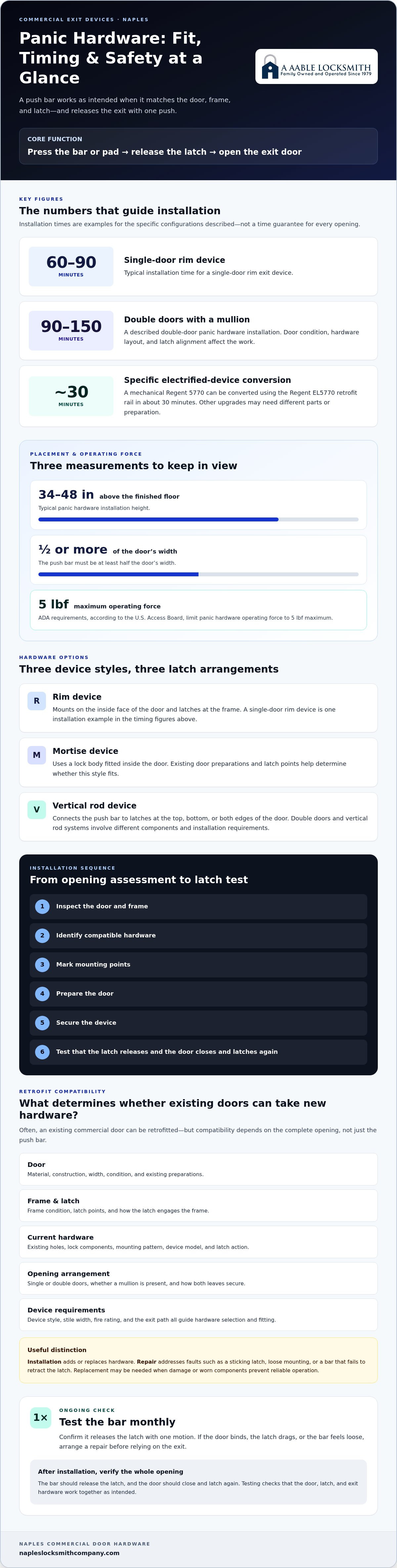
Installation follows a practical sequence: inspect the door and frame, identify compatible hardware, mark mounting points, prepare the door, secure the device, and test the latch. A single-door rim device installation typically takes 60-90 minutes. Double doors or vertical rod systems involve different components and installation requirements.
Commercial panic device installation and repair address different needs. Installation adds or replaces hardware; repair addresses faults such as a sticking latch, loose mounting, or a bar that fails to retract the latch. Replacement may be needed when damage or worn components prevent reliable operation. A technician examines the bar, latch, fasteners, and frame to identify the cause.
As part of maintenance, test the bar monthly to confirm it releases the latch with one motion. If the door binds, the latch drags, or the bar feels loose, arrange a repair before relying on the exit. A Naples locksmith handling commercial exit devices should assess the entire opening, explain the work, and test operation when the job is complete.
For local context, the door closer and exit device page covers this commercial hardware category in Naples.
Can you add panic hardware to existing doors?
Often, yes. An existing commercial door can receive panic hardware if its construction, frame, and latch arrangement suit the device. Begin by assessing the opening, including the door material, condition, and current exit hardware.
Retrofitting Existing Commercial Doors
A retrofit adds exit hardware to a door already in service, such as an aluminum storefront door. Inspect the door and frame for damage, then identify existing holes, lock components, and latch points. These details show whether the new device can use existing preparations or needs different mounting work.
For double doors, note whether the opening has a mullion and how both leaves secure. Installing double-door panic hardware with a mullion typically takes 90-150 minutes. That figure reflects this installation type, not every retrofit. Door condition, hardware layout, and the work needed to align the latches shape the task.
Exit Device Upgrades
An upgrade can replace worn or unsuitable hardware while keeping a serviceable door in place. Compare the existing device’s mounting pattern and latch action with the proposed hardware. For example, a mechanical Regent 5770 can be converted to an electrified device using the Regent EL5770 retrofit rail, in about 30 minutes.
That example applies to a specific device and retrofit rail. Other upgrades may require different preparations or components. Note the manufacturer and model of the existing device, then inspect how its latch meets the frame. A mismatch may require more than replacing the push bar, so assess the entire opening.
New Installations and Retrofits
A new installation starts with a door that has no exit device, while a retrofit adapts an existing opening. In either case, identify the door material, width, frame condition, and single- or double-door arrangement before selecting hardware. An aluminum storefront door, for example, may need a device suited to its narrow stile.
For a new installation, the installer lays out the hardware, prepares mounting points, secures the device, and tests its latch. A retrofit adds a preliminary check of existing holes and removal of old components without damaging the door. In either case, the bar should release the latch, and the door should close and latch again.
Choosing between new hardware and a retrofit comes down to door condition and compatibility. If the opening is sound, retaining the door may be practical; damage, misalignment, or incompatible preparations can change the scope. For help with commercial exit device installation, consider a full opening assessment before hardware is selected.
Commercial and industrial push bar installation
A push bar must suit the door, frame, and exit path. For a commercial or industrial opening, identify the door’s material, fire rating, width, and current latch. These details guide hardware selection and help prevent the bar from binding against the frame. The bar should release the latch with one push.
Placement affects both reach and operation. Typical panic hardware installation height is 34-48 inches above the finished floor, and the push bar must be at least half the door’s width. An installer measures from the finished floor, marks the mounting points, and checks clearance before drilling. This keeps the bar positioned for direct operation across the opening.
Fire-rated openings need compatible hardware. Fire-rated doors require UL-listed fire-rated panic hardware that suits the door’s rating and construction. A dogging feature holds the latch retracted for convenient passage, but it must not be used on fire-rated doors. Check the door label and device documentation before selecting or fitting parts.
Durability matters in busy facilities. Grade 1 BHMA panic hardware is described as durable for more than 1 million operational cycles. That rating can help assess hardware for frequent use, but fit and installation still matter. A commercial locksmith checks the mounting, latch engagement, and door alignment rather than relying on grade alone.
Access control can also affect the hardware choice. If an opening uses electrified latch retraction, the exit device and its electrical components must match the intended setup. For example, the Regent 5770 MDR-ELR operates at 24VDC @ 1 Amp. Alarm features may add 15-30 minutes to installation, so wiring and device operation belong in the installation plan.
During fitting, the installer secures the device, connects any specified components, then tests the bar and latch. Open the door from inside, confirm the latch clears, and check that the door closes and latches again. Repeat the test after adjusting a closer or frame alignment. A locksmith should identify any remaining issue rather than treating a sticking bar as ready for use.
For industrial exits, assess the entire opening, not just the push bar. Check clearance around nearby equipment, the door’s swing, and whether the frame allows the selected latch to engage. A licensed installer should follow the hardware manufacturer’s instructions and verify each operating function. These checks help ensure the device suits the door and its daily use.
Door operation and evacuation safety
During an evacuation, an exit device must release the door promptly and allow it to close correctly afterward. In Florida buildings, assess the complete opening, including the push bar, latch, frame, and closer.
Door Operation and Evacuation
Test the door from the egress side by pressing the bar once. The latch should release, the door should swing freely, and the closer should return it to the frame. NFPA 101 section 7.2.1.5 addresses panic hardware requirements for exit doors in certain commercial occupancies. High-occupancy assembly spaces with more than 100 occupants typically require panic hardware on all exit doors.
Operating force matters, too. According to the U.S. Access Board, ADA requirements limit panic hardware operating force to 5 lbf maximum. NFPA 101 lists an opening-force limit of less than 15 lbf for panic hardware. Consider the applicable requirement for the specific opening, then test the device with the door fully assembled.
Installation Problems and Safety Risks
Common problems include a misaligned latch, loose fasteners, a sticking bar, or a closer that prevents smooth opening. Any of these can interfere with egress, even if the device looks intact. Test the bar and door together, then inspect the latch edge and frame if the door fails to release or relatch.
Fire-rated doors need particular care. Dogging, which holds panic hardware retracted, is prohibited on fire-rated doors. Delayed-egress devices may have a maximum 15-second delay, must automatically release on fire alarm, and require signage. These features must operate as intended; they should not obstruct a normal exit path.
Use a consistent check after installation or adjustment. Press the bar, confirm the latch clears, and watch the closer return the door to its frame. Then verify that the latch engages without force or repeated handling. A door that closes but does not latch, or opens only after several pushes, needs correction before routine use.
Make panic hardware part of regular inspection. Test its one-motion operation monthly, and include it in an annual NFPA 80 fire door inspection. Record sticking, loose hardware, damaged components, or changes in closing speed. This history helps identify recurring issues, such as a latch that shifts after repeated use.
Assembly spaces deserve focused attention because occupant load affects exit hardware needs. Restaurants, theaters, churches, and convention facilities typically require panic hardware on all exit doors when they have more than 100 occupants. Check each exit, not just the main entrance, and ensure no furnishings or equipment obstruct the door’s swing.
A final operational review should include the closer and the surrounding path. If a closer pulls too strongly, it can make the door harder to open; if it fails to close the door, the latch may not secure the opening. Test the complete assembly from the egress side and correct alignment or hardware faults before relying on the exit.
Installation testing and compliance verification
After installation, test the full door assembly, not just the push bar. The device may move correctly while its latch, frame, or closer prevents the exit from working properly.
Yes. According to the U.S. Access Board, ADA requirements limit panic hardware operating force to 5 lbf maximum. Test the installed hardware under normal operating conditions, with the door fully assembled.
Use a consistent sequence for each opening in the facility:
- Press the bar from the egress side and confirm the latch releases with one motion.
- Open the door fully and check for contact with the frame, floor, or nearby equipment.
- Let the closer return the door, then verify the latch engages without extra force.
- Repeat the test with the door locked from the secure side, where applicable.
- For electrified hardware, test the intended release and access-control functions separately.
These steps can reveal common faults, such as a catching latch, loose device, or closer that resists opening. Record the symptom and opening location. For example, if a door releases when open but sticks when closed, the latch may be misaligned. Correct the cause, then repeat the full test.
Check the hardware against the door’s intended use and fire rating. Fire-rated doors require UL-listed fire-rated panic hardware. On these openings, confirm the installed parts match the door and that dogging does not hold the latch retracted. A device label alone does not prove the complete opening operates properly.
Where delayed egress is installed, verify its specific functions. The allowed delay may be a maximum 15 seconds, the device must automatically release on fire alarm, and signage is required. Test those functions as part of the installation review. The door must still respond correctly to the designated release conditions.
Keep a clear record for each tested opening. Note the device type, door location, test result, adjustments made, and any follow-up repair. Facilities with multiple exits can use that record to distinguish a recurring fault from a one-time adjustment. Include panic hardware in a monthly operational test and an annual NFPA 80 fire door inspection.
A thorough compliance review considers device operation, accessibility, door rating, and building use together. For a restaurant exit, for example, review the hardware, closer action, signage, and any delayed-egress controls as a whole. This gives building staff a practical record of what was tested and what still needs attention.
Arrange commercial exit device testing
A Aable Locksmith: Digital Keypad Lock Installation
A Aable Locksmith installs digital keypad locks for businesses that need keypad entry at an appropriate door. A keypad lock controls access, while an exit device provides emergency egress; they serve different purposes. Consider the door’s daily use and the access you want to manage before choosing hardware.
For other property needs, A Aable Locksmith also provides lock rekeying, sliding glass door lock security, and new hardware installation. These services can address a worn lock, a sliding-door security concern, or a hardware update without confusing those needs with exit-device operation. The right solution depends on the opening and its purpose.
For help with keypad installation or related lock and hardware needs, contact A Aable Locksmith.
Plan the Right Next Step for Your Door
A commercial exit opening is part of how staff and visitors move through your building each day. If its hardware is worn, difficult to operate, or due for an upgrade, start with a practical review of that opening. The goal is a setup that supports controlled access and clear egress without treating those needs as interchangeable.
For commercial exit device installation in Naples, contact A Aable Locksmith about your commercial exit hardware needs. The company also provides digital keypad lock installation, lock rekeying, and sliding glass door lock security for other openings. Choose the next step based on the door and the access concern you want to address.
A well-considered hardware decision can make daily use more straightforward. Take the next step when you’re ready to discuss the opening that needs attention.
Frequently Asked Questions
Are panic bars fire-rated?
Some panic hardware is made for fire-rated doors, but not every panic bar is fire-rated. Fire-rated doors require UL-listed fire-rated panic hardware that matches the door assembly. For example, a device with an incompatible label or function may not suit a labeled opening. Dogging, which holds the latch retracted, is prohibited on fire-rated doors. Check the door label and device markings together when reviewing the hardware.
Can panic bars be locked from outside?
Yes, exterior access can be controlled while the interior panic bar still provides egress. Depending on the device configuration, the exterior trim may use a key cylinder or another compatible access method. For example, staff may unlock the outside trim for entry while visitors leave using the bar. Exterior security and interior release serve separate functions. Test both after any hardware adjustment.
How much does panic bar installation cost?
Installation price depends on the case and is given after a quote request. Cost factors include the device style, door material, existing preparations, frame condition, and whether the opening needs electrified components or additional repair. A replacement using compatible mounting points can involve different work from fitting hardware to an unprepared door. Describe the door and the work needed when requesting a quote, so the scope reflects the actual opening.
Need Panic Hardware Work Today?
If a panic bar is sticking, damaged, or failing to release the latch, treat the opening as a safety concern and limit reliance on that door until it operates correctly. A Aable Locksmith provides emergency locksmith services, but emergency availability does not establish a specific arrival time or guarantee same-day panic hardware work. Contact the business to discuss the issue and the opening’s condition, especially if the door is part of an active exit route.
How much does commercial panic bar installation cost in Naples, FL?
Commercial panic bar installation pricing in Naples depends on the door and project scope; a quote request is needed for the price. Factors include the device type, door and frame condition, existing hardware, and whether the work involves a retrofit or new preparation. Electrified features can also affect the installation scope. Providing clear details about the door and any current operating problem helps make the quote specific to the opening.
Florida Building Code requirements for commercial exit devices and panic hardware
NFPA 101 section 7.2.1.5 addresses panic hardware requirements for exit doors in certain commercial occupancies; high-occupancy assembly spaces with more than 100 occupants typically require it on all exit doors. The material also gives a maximum operating force of 5 lbf, requires UL-listed panic hardware on fire-rated doors, and prohibits dogging on those doors.
Naples, Florida permits or inspections required for commercial exit device installation
Panic hardware should be included in an annual NFPA 80 fire door inspection, and the device should be tested after installation.


