


Article by
Jonathan Dier
Jonathan Dier is the owner of A Aable Locksmith, a family owned and operated Locksmith company serving the Naples Florida area since 1979. He has over 35 years experience in the Locksmith and Security industry. A Aable Locksmith specializes in residential and commercial security, focusing on customer satisfaction.
What if the best smart lock for your Naples home is the one that fits your door properly before it connects to your phone? A wifi enabled keypad lock installation Naples homeowners can feel confident about starts with the door and existing deadbolt, not a long list of app features. If the hardware doesn't fit or the Wi-Fi signal is weak at the entry, connected features may not work as you expect.
Keyless entry can make daily routines easier, but the right lock should also suit your door, household, and comfort with connected technology. This guide covers how to compare keypad and Wi-Fi functions, what to look for before installation, and what to expect during fitting and setup. A Aable Locksmith is a family-owned, third-generation locksmith serving Naples since 1979, with experience installing Wi-Fi-enabled keypads and digital keypad locks. Here's what to consider before choosing your lock.
Key Takeaways
- Understand the difference between keypad entry and connected remote access so you can choose features that fit your household.
- Check the door's condition, lock format, and latch alignment before selecting hardware. Smooth movement helps support dependable operation.
- Compare connected features against who needs access and how often codes may change.
- Know what to expect from wifi enabled keypad lock installation Naples, from assessing the door to fitting the hardware and reviewing operation.
- A Aable Locksmith installs keypad locks with attention to the door and intended use, and works with hardware brands including Schlage, Yale, and Emtek.
Why Naples Homeowners Choose Wi-Fi-Enabled Keypad Lock Installation
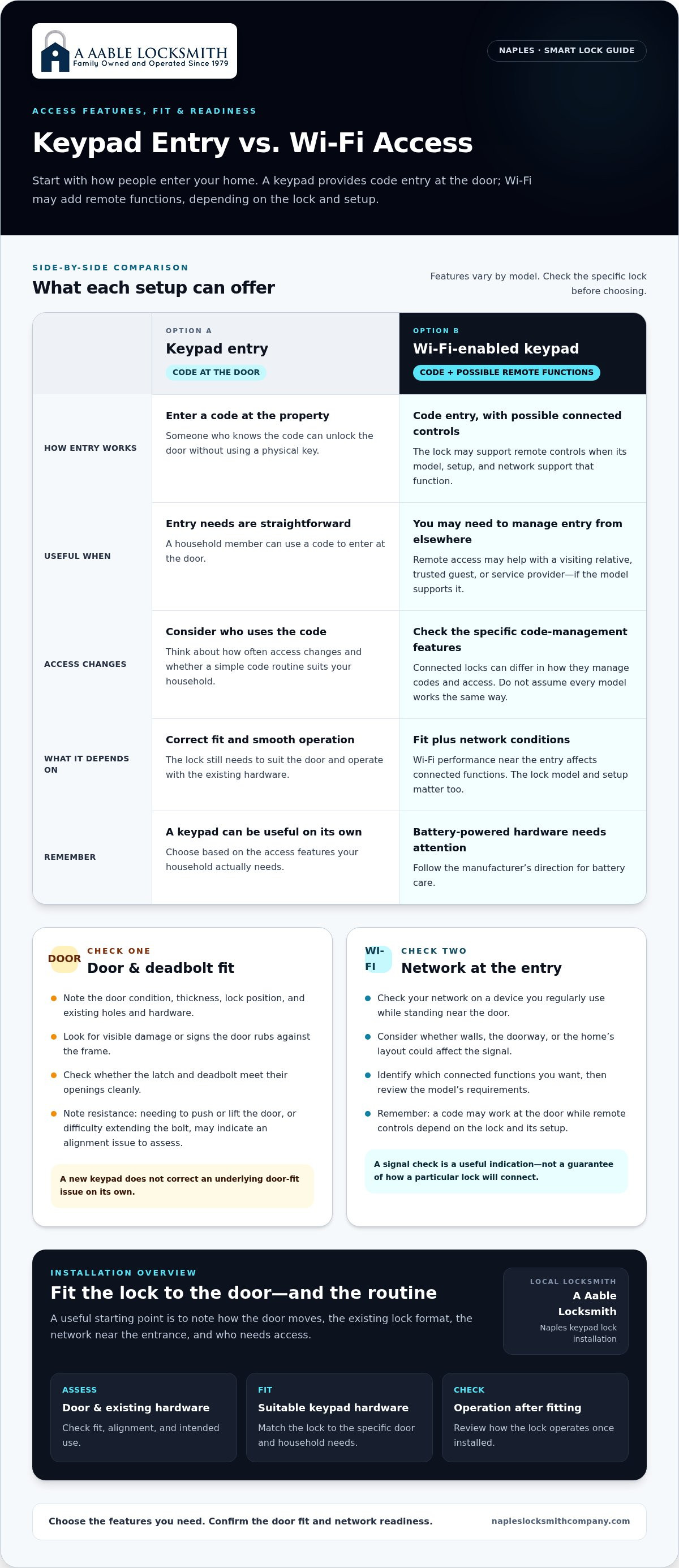
A keypad can simplify everyday entry, but "smart lock" can refer to different functions. A keypad lock lets someone enter a code at the door without using a physical key. A Wi-Fi-enabled model may also connect to your home network and support remote functions. Those capabilities vary by model, so choose based on the features you need rather than assuming every keypad offers the same access options.
Watch this short video for a look at how a keypad lock works before we go further:
In brief: Keypad entry unlocks a door with a code. A compatible Wi-Fi connection may enable additional controls, depending on the lock's model and setup.
For a closer look at the technology and common access methods, see this Smart Lock Technology Overview. A keypad can be useful on its own; network access may be valuable when you need to manage entry from elsewhere. Check the functions supported by the specific model before choosing.
Keypad entry versus Wi-Fi-enabled access
With keypad entry, someone who knows the code can unlock the door at the property. A connected model may also support remote controls, but the lock and its setup must suit the task. For example, a household member arriving before you could use a keypad code. If you're away and need to manage access for a visiting relative, remote access may help if the model supports that function.
When connected entry suits a Naples property
Think about who needs access and how often that changes. Household members may value a simple way to enter, while a trusted guest or service provider may need access during a planned visit. Connected features may also be useful for a seasonal property when you're away, depending on the lock's functions and the network at the entry.
Connectivity adds a few practical considerations. Wi-Fi performance at the door affects connected functions, and battery-powered hardware needs attention as directed by the manufacturer. Consider who will use each code and whether access needs change over time. The right lock should be manageable as part of your routine, not an extra system that requires constant attention.
Start with the door and your household's routine, then compare suitable hardware. Door condition, existing lock preparation, access needs, and network performance all matter. A Aable Locksmith provides digital keypad lock installation in Naples, fitting the lock with attention to the specific door and intended use.
Check Door Fit and Wi-Fi Readiness Before Installation
Before choosing a lock, look at the door, the way the existing deadbolt operates, and whether your network reaches the entry. These checks address separate needs: the hardware must fit and move properly, while Wi-Fi supports the lock's connected functions.
Quick checklist: Note how the door and existing lock operate, check the network near the entry, and list who needs access and which features matter.
Use these observations to describe the door, not to diagnose a hardware problem. A stiff bolt or uneven gap can have more than one cause, so have the door assessed before fitting new hardware.
Does the existing door suit a keypad lock?
Start with the door's condition and existing lock format. Door thickness, the current lock's position, and the existing holes and hardware can affect whether a particular keypad lock will fit. Look for visible damage or signs that the door rubs against the frame. Check whether the latch and deadbolt meet their openings cleanly.
Resistance is worth noting. If the door needs a push or lift to close, or the deadbolt is difficult to extend, the bolt may not be lining up with the strike plate. A new keypad won't correct an underlying fit issue on its own. During installation, the locksmith assesses the door and hardware, fits the lock, and checks how it operates.
Is Wi-Fi available where the lock will be installed?
Coverage can vary from room to room. Stand near the entry and check the network on a device you regularly use. Consider whether walls, the doorway, or the home's layout could affect the signal. This gives you a useful indication, but the lock model and network conditions both affect its connection.
Separate connected functions from basic keypad use. A code may operate the lock at the door, while remote controls depend on the model and its setup. Before choosing, identify the connected functions you want and review the specific lock's requirements. Don't assume all Wi-Fi keypads connect or manage codes in the same way.
Write down what you notice: how the door moves, the existing lock format, the network near the entrance, and who needs access. These details help focus the installation on hardware suited to your property. A Aable Locksmith provides digital keypad lock installation, tailored to the door and intended use. This preparation gives wifi enabled keypad lock installation Naples homeowners can plan around a practical starting point.
Compare Wi-Fi Keypad Features Without Overbuying
Compare locks against your household's access routine, not just the length of a feature list. If everyone who uses the door can enter a code and you rarely need to manage access while away, a straightforward keypad may be enough. Connected functions may help when access needs change or you want to manage entry remotely. The available features depend on the lock and its setup.
Use this comparison to identify what matters before selecting hardware. It's a decision guide, not a guarantee that every lock in either category includes the same functions.
Which access features solve a real household need?
Consider who needs to enter, how often that changes, and whether you need to manage access while away. A household with regular users may value simple code entry. If a trusted guest or service provider visits while you're out, a connected model could help if it supports the remote controls you need. Don't assume every model offers app controls or temporary codes.
| Household need | What to prioritize | Question to ask |
|---|---|---|
| Regular household access | Convenient keypad entry | Will users mainly unlock the door at the keypad? |
| Occasional visitors | Code management suited to your routine | Can the selected model manage access the way you need? |
| Access while away | Supported connected controls | Does its specific setup provide the remote function you want? |
| Seasonal occupancy | Features you can operate and maintain while away | How will you handle codes, connectivity, and battery upkeep? |
Think through how often codes need to change. If the same trusted users enter routinely, frequent changes may not be part of your routine. If access needs shift regularly, make code management a priority and learn how the specific lock handles it. This keeps the choice focused on useful controls rather than features that add little to daily use.
How should security and appearance factor into the choice?
Connected features don't replace proper installation or a door that closes and locks correctly. A keypad still needs to suit the existing lock position and hardware. Consider the whole entry, too: the keypad's finish and shape should coordinate with the handle and other exterior details. For ideas about balancing curb appeal and security, explore these high-end front door lock considerations.
Battery and backup-entry details vary by model. Before deciding, find out how the selected lock is powered, what maintenance it requires, and what entry options it provides if its usual method isn't available. Don't assume every keypad includes a physical key or the same backup method.
Choosing wifi enabled keypad lock installation Naples homeowners can feel comfortable with means matching the lock to the household, not buying every connected feature on offer. A Aable Locksmith tailors keypad installation to the door and intended use. Explore digital keypad lock installation to learn more about the service.
What Happens During Professional Keypad Lock Installation in Naples?
Professional installation involves more than attaching a keypad to the door. The locksmith considers the existing lock, door movement, and selected hardware, then checks operation and explains the setup. For wifi enabled keypad lock installation Naples homeowners can expect the work to be tailored to the door and intended use, since fit and model-specific functions vary.
Assessment and hardware fitting
The work begins with the existing door and lock. The locksmith reviews the installation location and checks how the door closes and how the current deadbolt moves. If the door rubs, the latch meets resistance, or the bolt doesn't line up smoothly with the strike plate, those details help guide the fitting.
After selecting hardware suited to the door, the locksmith fits and adjusts it so the deadbolt can move as intended. The lock, door, and frame need to work together; forcing a bolt into an opening can make normal operation difficult. The installation is adapted to the conditions at the entry.
Operation checks and homeowner handoff
After fitting, the locksmith checks the keypad and mechanical operation. The door should be tested in its ordinary closed position as well as with it open, so the lock's interaction with the frame can be assessed. You can see how the selected access method works and ask practical questions before using it day to day.
Connected setup depends on the selected lock. If the model supports Wi-Fi functions, setup and testing follow its instructions and depend on network conditions. Testing can show whether supported functions work during setup, but it can't guarantee future network performance. Keypad entry and remote features are distinct, so understand which actions work at the door and which depend on the connection.
The handoff should cover routine care, too. Learn how the selected lock's battery should be monitored or replaced, and review any backup-entry method included with that model. Follow the product's instructions because care and backup options differ. Knowing the basics helps you use the keypad confidently and understand what to do if its usual access method needs attention.
Installation at a glance:
- Assess the door. Review existing hardware, door movement, and lock placement.
- Fit the hardware. Install and adjust the selected lock to suit the door.
- Check operation. Test keypad entry and the deadbolt's mechanical movement.
- Explain use. Review the access method, supported connected setup, and model-specific care.
A careful installation gives you a chance to understand how the lock works before it becomes part of your daily routine. A Aable Locksmith installs keypad locks in Naples, fitting the work to the existing door and selected hardware.
Arrange Wi-Fi Keypad Lock Installation with a Naples Locksmith
You've considered the door, network, and access routine. Use those details to plan an installation tailored to your property instead of choosing hardware by feature list alone. Share what you've noticed about the existing lock, how the door operates, and which connected functions matter to you. That gives the locksmith a practical starting point for discussing the hardware and installation.
Why local experience matters for a smart lock
A Aable Locksmith is a family-owned, third-generation locksmith serving Naples since 1979. The company also serves Bonita Springs, Estero, Golden Gate, North Naples, East Naples, and Marco Island. Its services include digital keypad installation, lock rekeying, and hardware installation, with solutions tailored to the property.
The company works with premium hardware brands including Schlage, Yale, and Emtek. Features vary by model, so the brand name alone doesn't determine what a lock can do. For wifi enabled keypad lock installation Naples homeowners can rely on, choose hardware that suits both the door and the household's access needs. Connectivity is one consideration, not the only one.
Prepare for your installation estimate
Before requesting an estimate, gather a few details about the entry. You don't need to measure or diagnose the lock yourself. Clear observations help describe the project and the routine you want the keypad to support:
- Note whether the existing lock is a deadbolt or another format, and describe any difficulty closing the door or turning the bolt.
- Share who needs access, whether visitors or trusted service providers use the entry, and how often access needs change.
- Describe whether you want keypad entry alone or connected functions, and mention any Wi-Fi concerns near the door.
- If you have a hardware style in mind, explain how it should coordinate with the existing handle or front-door appearance.
A Aable Locksmith provides free estimates and personalized service for your property. Same-day service is available. Share what you know about the door and access needs, and the installation discussion can focus on the details that matter without requiring you to settle every technical decision in advance.
Whether you're updating a primary residence or preparing a seasonal property, a clear estimate is a practical next step. Describe your entry, ask about the proposed hardware and setup, and make sure you understand how the lock will work for the people who use it.
Make Your Next Entry Upgrade a Confident One
A new lock becomes part of your daily routine, so choose with the people who use the door in mind. Consider what would make entry simpler, which connected controls you'd use, and what kind of setup you're comfortable maintaining. That clarity makes wifi enabled keypad lock installation Naples a more considered decision, shaped around your home rather than a feature checklist.
You don't need every technical answer before getting started. A conversation about your entry and household routine can turn your preferences into a practical installation plan. Choose an access setup that feels useful and manageable for your property.
With the right fit and a clear plan, you can add keypad convenience with confidence.
Frequently Asked Questions
Does a Wi-Fi-enabled keypad lock still work if the internet goes down?
It depends on the lock model. Keypad entry may work independently of internet access, while remote functions can rely on a connection. Follow the manufacturer's instructions for the specific lock rather than assuming how it behaves offline. Before relying on it as your main entry method, understand which options remain available during an outage and what backup-entry method the model provides.
Can I control a Wi-Fi keypad lock when I am away from home?
Some models support remote controls, but the available functions depend on the lock and its setup. If a family member needs access while you're away, remote management may help if the selected model supports the action you need. If household members mainly enter a code at the door, you may not need those connected controls. Compare the model's instructions with your routine.
Will a Wi-Fi-enabled keypad lock fit my existing front door?
Fit depends on the door, its existing lock preparation, and the selected hardware. A door that closes unevenly or a deadbolt that catches may need attention when planning the installation. Describe those symptoms and the type of lock currently on the door. A professional assessment helps determine how the hardware fits the entry before installation.
Is a Wi-Fi keypad lock a good choice for a seasonal home in Naples?
It can suit a seasonal home if keypad entry or the selected model's connected functions fit how you manage visits. Consider who needs access between stays, how you'll handle codes, and how you'll maintain the lock while the property is vacant. These are useful considerations for owners in Naples, Bonita Springs, Estero, Golden Gate, North Naples, East Naples, and Marco Island.
Do Wi-Fi-enabled keypad locks need batteries?
Power requirements vary by model, so follow the manufacturer's instructions for the specific lock. Include battery care in your household routine, especially if the property is unoccupied for stretches of time. During installation, learn how the selected model indicates that maintenance is needed and what backup-entry method it supports. Battery type, replacement guidance, and backup options can differ between locks.
Can multiple people use a Wi-Fi-enabled keypad lock?
That depends on the model's code and user-management options. Before selecting hardware, list who needs regular access, such as household members, and whether visitors need occasional access. Then consider whether those needs change often enough to make code management important. Ask the installer to explain the selected lock's documented options so users know which access method to follow and how to handle changes.


